
DIGITIZING YOUR PRESENTER PERSRONA

Submission guidelines for creating your digital presenter.

Please follow the technical and styling instructions below during your photo shoot. Adhering to these guidelines ensures optimal facial mapping, accurate hand tracking, and a seamless final video output.

Instructions for voice recording
SurgeIR digitizing your presenter persona
Please read these instructions carefully

Framing & composition

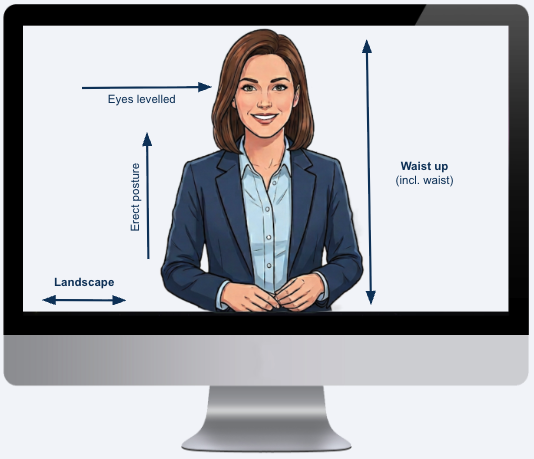
  • Torso-up framing: Frame the shot from the waist/mid-torso up, exactly as shown in the reference image. Avoid full-body with too much distance from the camera. This reduces facial detail and results in a lower quality avatar.


  • Hands: Keep both hands low in a natural way. We will ensure versions that ex- and include hands for different scenes.


  • Eye-level angle: Position the camera perfectly at eye level. Avoid any inclination. Do not shoot from below, above, or from the side. 


  • Looking straight at the camera: A direct gaze gives the avatar the most natural eye contact when speaking. Slight angles can cause drift in the generated output.


  • Landscape orientation: Ensure the photo is taken in landscape format to allow for proper framing and digital adjustments.

Appearance & styling

  • Hair grooming: Ensure hair is neatly combed and styled. Double-check for any stray hairs or flyaways sticking out, as these can create artifacts during the digital cloning process.


  • Wardrobe selection: Wear professional or comfortable clothing that you are happy to see your digital twin wear repeatedly.


  • Pattern restrictions: If possible, avoid clothes with stripes, checkers, or intricate geometric patterns, as these can cause visual distortions (moiré effect) in the final video. Stick to solid colors.


  • Glasses: It is OK to wear glasses for your avatar, but make sure they do not reflect light as this will also be visible in the final avatar.

Background & environment

  • Natural background: If you want a specific real-world background, it is best to shoot directly in that environment (ensure it is captured in landscape).


  • Synthetic/digital background: If you plan to swap the background digitally later:


    • Shoot the person against a solid, clean white background.


    • Opt for a lighter background setup overall, as it yields significantly better results than darker backgrounds during the cloning process.


  • Image quality: The raw photo must preferably be in ultra-high resolution to ensure a high-grade, qualitative digital twin. At a minimum, we can work with a 1080p resolution in 16:9 (landscape /preferred) or 9:16 (vertical) aspect ratio.